
Listen to this article
Excel challenges are increasingly becoming a focal point in the realm of data management as businesses navigate the complexities of digital transformation. While Excel remains a staple in workplaces, its limitations can lead to inefficiencies and inaccuracies, especially in environments that require robust Excel analysis and data visualization. Many organizations find themselves struggling with poorly documented spreadsheets, ultimately facing significant operational risks when relying heavily on this tool. As experts voice concerns about Excel’s effectiveness, the need for exploring Excel alternatives becomes paramount in fostering better data practices. Adopting modern solutions may not only enhance data management processes but also lead to substantial cost savings across various industries.
In the landscape of workplace productivity, managing spreadsheets effectively and evaluating alternatives to traditional tools has become essential. The issues stemming from reliance on spreadsheet software have prompted organizations to rethink their approach to data processing and analysis. As digital transformation initiatives gain momentum, the necessity for streamlined data practices is evident, urging professionals to explore data management systems that can offer enhanced functionality. Transitioning from familiar applications to more sophisticated platforms can be daunting, yet it holds the promise of improved operational efficiency and accuracy. Recognizing the role these alternatives play in modern data visualization can facilitate a smoother transition, ultimately empowering teams to leverage their data more effectively.
The Enduring Relevance of Excel in Data Management
Excel’s legacy spans four decades, maintaining its relevance across numerous industries due to its functionality and familiarity among users. As a powerful tool for data management, its role in workplaces cannot be understated; over two-thirds of office workers tap into its capabilities at least once every hour. This widespread usage stems from its ability to cater not only to simple calculations but also to complex data analysis tasks, aligning perfectly with the ongoing digital transformation organizations are experiencing today.
Moreover, the integration of Excel with other software like Word and PowerPoint has cemented its place as an essential tool in the realm of technology education. As companies evolve and seek innovative data strategies, the versatility of Excel remains a cornerstone, providing users with options to visualize data effectively. Understanding this foundational element of data management helps companies leverage their existing resources while exploring potential Excel alternatives that may enhance their operational efficiency.
Navigating Excel Challenges in Organizations
Despite its strengths, organizations must navigate various Excel challenges that arise from misuse and misunderstanding. Experts like Prof. Mark Whitehorn highlight the difficulty many companies face in distinguishing data processing from analysis. As spreadsheets become cluttered and poorly documented, firms risk becoming dependent on fragile systems. This reliance can lead to operational inaccuracies, especially when automated processes fail due to complexities that staff are unable to manage, particularly when the original creators of the spreadsheets are no longer around.
Recent incidents, such as those reported by Health New Zealand and staffing issues in the UK, illustrate the cascading effects of spreadsheet errors. As organizations reassess their reliance on Excel, they are forced to confront the reality of evolving data landscapes that demand transparency and accuracy. Recognizing and addressing Excel challenges is critical for companies aiming to develop robust and reliable data management frameworks that can support their long-term objectives.
The Shift Towards Modern Data Management Solutions
Organizations seeking to embrace modern data management strategies may find themselves at a crossroads with their dependence on Excel. Transitioning to dedicated data systems can enhance operational efficiencies and mitigate risks associated with data handling. Kate Corden’s experience with adopting LinkSpace as a solution demonstrates how smaller organizations can benefit significantly from consolidating their data. This shift not only fosters better organization but also reduces errors that often arise from managing critical information in spreadsheets.
For larger enterprises, the potential advantages of migrating away from Excel are immense. By integrating advanced technologies, companies stand to achieve smoother workflows and standardized data practices, which are crucial for effective AI modeling. Moutie Wali’s experience at Telus highlights a staggering anticipated savings of C$42 million annually through the elimination of redundant processes and optimization of data systems, underscoring the financial incentives that modern solutions can provide.
The Resistance to Change in Data Practices
While adapting new data management practices is essential, an inherent resistance to change often complicates the transition away from Excel. Employees may feel a sense of ownership and familiarity with Excel and its functionalities, leading to reluctance in adopting new systems. This sentiment is echoed by Wali’s challenges at Telus, demonstrating that disrupting the status quo is fraught with challenges that require careful management to navigate employees’ attachment to spreadsheet tools.
Addressing this resistance involves not just implementing new technologies but also fostering an organizational culture that values data literacy and flexibility. Training and support can play pivotal roles in easing the transition, ensuring that employees feel confident in their abilities to adapt to new systems. Ultimately, successful change management can lead to greater acceptance and utilization of advanced data management solutions, paving the way for future innovations.
Balancing Excel with Emerging Technologies
Rather than completely eliminating Excel from the workplace, many organizations are recognizing the importance of balancing its use with emerging technologies. This hybrid approach allows companies to maintain the familiarity of Excel while exploring data management systems that provide enhanced capabilities. The challenge lies in striking a balance that maximizes the strengths of both while minimizing the risks associated with reliant dependence on Excel alone.
Moreover, the development of innovative tools and systems that integrate well with existing software can foster a smoother transition for users accustomed to Excel. By creating an environment where users can continue to utilize their Excel skills in tandem with new technologies, organizations can enhance productivity and data integrity without facing total backlash from employees. This balance may require continued education and a robust support system, but it is a vital step toward sustaining corporate data transformation.
Excel’s Role in Data Visualization and Analysis
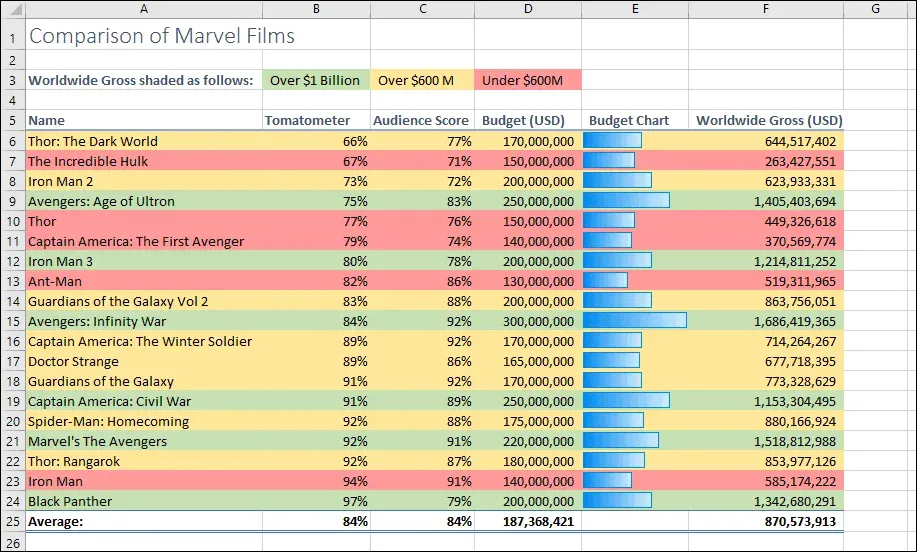
Excel has long been hailed as an excellent tool for data visualization and quick analysis, thanks to its array of features that facilitate effective presentations and graphing capabilities. According to Tom Wilkie, CTO of Grafana, Excel stands out as a primary choice for examining small datasets or creating quick charts, making it invaluable for professionals looking to derive insights rapidly. This aspect of Excel aligns with the increasing demand for data-driven decision-making in today’s fast-paced business environment.
However, as firms migrate towards more advanced data visualization tools, the need to assess the unique benefits provided by these alternatives is crucial. While Excel is effective for quick visual output, dedicated visualization platforms may offer enhanced functionalities, including interactive dashboards and more sophisticated data analytics, which cannot be achieved with traditional spreadsheets. Rethinking Excel’s role in data visualization is essential as organizations weigh the advantages of evolving beyond its limitations while still acknowledging its historical significance.
Maintaining Accuracy and Integrity in Spreadsheets
The integrity of data is paramount, yet Excel users often struggle with maintaining accuracy as spreadsheets become increasingly complex. The automation of data tasks through macros and formulas can inadvertently lead to errors that may compromise critical decision-making processes. As Prof. Whitehorn aptly points out, the increasing intricacy of spreadsheets can obscure a user’s ability to grasp their own data accurately, resulting in potentially damaging consequences for organizations reliant on flawed datasets.
To combat these challenges, regular audits of spreadsheet content and structure are essential practices that organizations must adopt. Implementing clear documentation about how data flows within these systems can enhance transparency and allow teams to understand the intricate details behind calculations and insights generated from the spreadsheet. By prioritizing accuracy and integrity, businesses can safeguard against the pitfalls often associated with an overreliance on Excel, fostering a culture of responsible data usage.
Exploring Excel Alternatives for Enhanced Efficiency
As organizations strive for enhanced efficiency in data management, exploring Excel alternatives becomes a vital consideration. Many modern tools are designed to cater specifically to large datasets and sophisticated analytics, which can outstrip Excel’s capabilities. Software solutions like Google Sheets, Airtable, or specialized data management platforms offer collaborative features and integrations that make data handling smoother and more effective, appealing to companies looking to streamline operations.
Furthermore, dedicated alternatives often provide enhanced security measures, reducing the risks associated with data inaccuracies and unauthorized access. By leveraging these options, organizations can minimize the vulnerabilities associated with extensive spreadsheet use while still retaining robust analytical capabilities. This exploration of alternatives supports the advancement of digital transformation initiatives, empowering businesses to make informed decisions based on reliable data.
The Future of Excel in Corporate Settings
Looking ahead, the future of Excel in corporate settings lies at the crossroads of preserving its traditional strengths while embracing modern data management paradigms. Organizations must critically evaluate their current uses of Excel and establish whether it complements their digital transformation trajectories or hinders progress. While Excel may never fully fade from the corporate landscape, its role will likely be redefined as businesses adopt innovative approaches to data management.
As companies acknowledge the necessity of evolving alongside technological advancements, a new perspective on Excel’s functionality will emerge. Instead of viewing it merely as a necessity, businesses are likely to recognize it as one tool among many that can enhance their overall data strategy. Understanding this status will allow organizations to optimize their performance and adapt their workflows, ensuring that they remain agile in an increasingly data-driven world.
Frequently Asked Questions
What are some common Excel challenges faced in data management?
Excel challenges in data management often include issues like data accuracy, version control, and complexity in formulas. As organizations grow, relying heavily on Excel can lead to spreadsheet errors that compromise data integrity. This is crucial because, without proper documentation, organizations risk operational failures due to fragile systems.
How can organizations address Excel challenges during digital transformation?
To overcome Excel challenges during digital transformation, organizations should prioritize training employees on new data management tools and practices. By encouraging the transition from Excel to more robust data systems, companies can mitigate risks associated with outdated spreadsheet reliance and streamline their workflow.
Are there effective alternatives to Excel for data analysis?
Yes, several effective alternatives to Excel for data analysis include tools like Google Sheets, Tableau, and Microsoft Power BI. These tools offer advanced data visualization capabilities and are specifically designed to handle larger datasets more efficiently than Excel, addressing common challenges associated with spreadsheet applications.
How does Excel impact data visualization challenges for businesses?
While Excel provides basic data visualization options, its limitations can hinder businesses’ ability to perform in-depth analysis. Serious data visualization challenges arise when attempting to present complex datasets, as Excel can become cumbersome. Utilizing dedicated visualization tools can enhance clarity and insight from data.
What are the risks of relying too heavily on Excel for critical financial data management?
Relying heavily on Excel for critical financial data management poses significant risks, including errors due to miscalculations and poor documentation. High-profile incidents have occurred where critical decisions were based on flawed spreadsheets, emphasizing the need for more secure and reliable data management solutions beyond Excel.
How do Excel challenges affect the transition to new data management systems?
Excel challenges often lead to resistance among employees when transitioning to new data management systems. Users may feel a sense of ownership and control over their spreadsheets, making them reluctant to adopt unfamiliar tools. Organizations need to address these fears through clear communication and training to smooth the transition.
What role does Excel still play in modern workplaces despite its challenges?
Despite its challenges, Excel maintains a significant role in modern workplaces due to its familiarity and ease of use for simple tasks. It serves as a quick analysis tool for small datasets and remains widely utilized for basic reporting and budgeting functions, coexisting alongside newer technologies.
How can smaller organizations mitigate Excel challenges?
Smaller organizations can mitigate Excel challenges by adopting dedicated data management systems that enhance data organization and accuracy. Transitioning to tools that consolidate data more effectively can reduce the risks associated with Excel usage, helping to streamline operations and improve data reliability.
What strategies can organizations implement to reduce reliance on Excel in data analysis?
Organizations can reduce reliance on Excel by implementing comprehensive training programs on alternative data analysis tools, encouraging a culture of data literacy, and gradually phasing out Excel usage in favor of solutions that better handle large datasets and facilitate collaboration among teams.
What is the future of Excel as organizations move towards digital transformation?
The future of Excel as organizations undergo digital transformation may involve integrating it with new technologies rather than complete elimination. Excel is likely to coexist with more sophisticated data management and analysis systems, evolving into a complementary tool rather than the primary platform for data tasks.
| Key Points | Details |
|---|---|
| Excel’s Age | Excel has been around for 40 years and remains integral in workplaces. |
| Usage Frequency | Two-thirds of office workers use Excel at least once per hour. |
| Integration in Workplaces | Excel is a staple alongside Word and PowerPoint in technology education. |
| Quick Analysis | Excel is praised for its effectiveness in quick data analysis and chart creation. |
| Risks of Misuse | Poor documentation and reliance on fragile systems can lead to data inaccuracies. |
| Real-world Example | Health New Zealand faced issues due to reliance on an Excel spreadsheet for financial data. |
| Transition Challenges | Organizations face resistance when transitioning to new data management systems. |
| Benefits of Modernization | Adopting new technologies can optimize workflows and lead to significant cost savings. |
| User Resistance | There is a challenge of letting go of perceived control over data in Excel. |
| Conclusion | Rethinking Excel’s role in the workplace is essential for future data practices. |
Summary
Excel challenges remain prevalent in many organizations as they grapple with the duality of utilizing a beloved tool while managing the risks associated with its misuse. Addressing the reliance on Excel through modernization and transitioning to newer data practices can significantly improve data accuracy and operational efficiency. As experts suggest, organizations must find a balance between respecting legacy systems while encouraging innovation—especially in an era where data management is critical for success.